Searches for a same-day bike repair and checks the opening hours
Service blueprint template
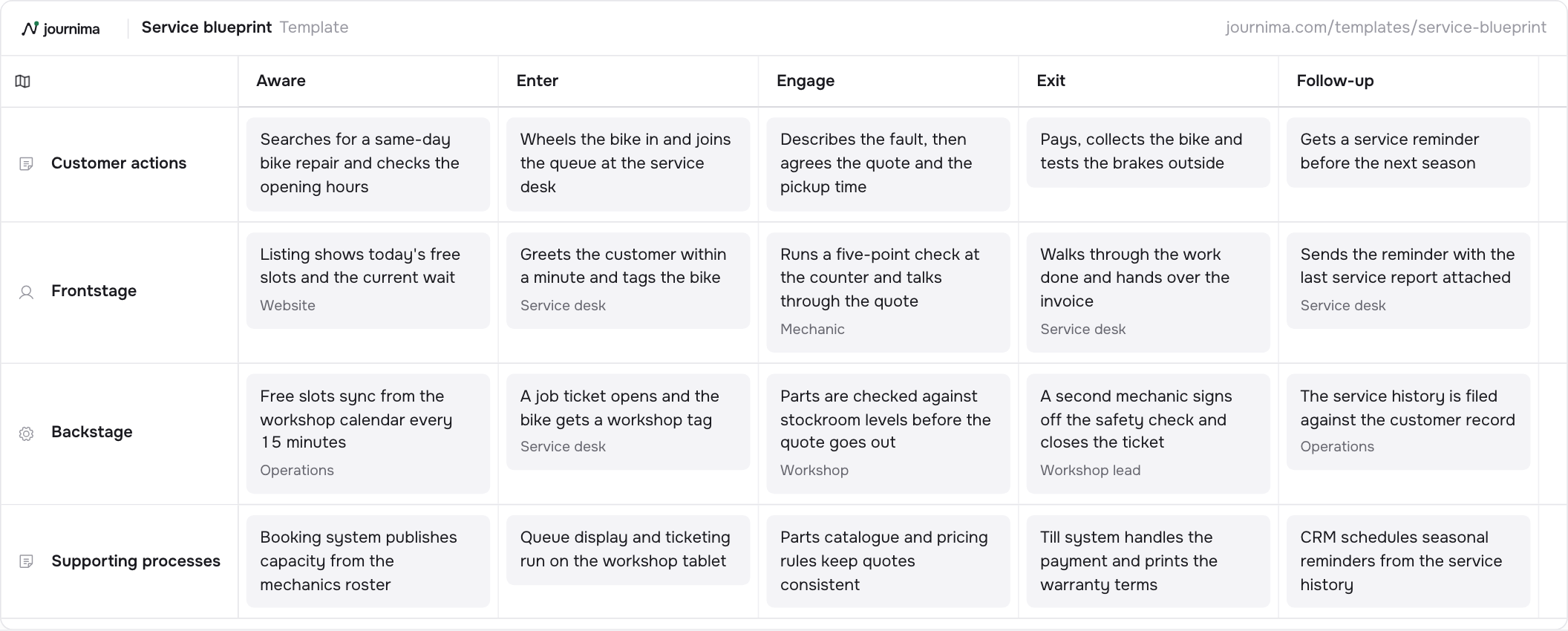
Frontstage and backstage view of one service encounter, from first contact to follow-up.
Service blueprintTemplate
01Aware
02Enter
03Engage
04Exit
05Follow-up
Customer actions
Wheels the bike in and joins the queue at the service desk
Describes the fault, then agrees the quote and the pickup time
Pays, collects the bike and tests the brakes outside
Gets a service reminder before the next season
Frontstage
Listing shows today's free slots and the current wait
Greets the customer within a minute and tags the bike
Runs a five-point check at the counter and talks through the quote
Walks through the work done and hands over the invoice
Sends the reminder with the last service report attached
Backstage
Free slots sync from the workshop calendar every 15 minutes
A job ticket opens and the bike gets a workshop tag
Parts are checked against stockroom levels before the quote goes out
A second mechanic signs off the safety check and closes the ticket
The service history is filed against the customer record
Supporting processes
Booking system publishes capacity from the mechanics roster
Queue display and ticketing run on the workshop tablet
Parts catalogue and pricing rules keep quotes consistent
Till system handles the payment and prints the warranty terms
CRM schedules seasonal reminders from the service history
What is in the service blueprint template
5 stages
- Aware
- Enter
- Engage
- Exit
- Follow-up
4 lanes
- Customer actions
- Text
- Frontstage
- Frontstage
- Backstage
- Backstage
- Supporting processes
- Text
When to use a service blueprint
Use it when the problem is behind the counter. A blueprint puts the customer's actions above the line of visibility and the frontstage, backstage and supporting processes below it. It is the map for handoffs, waiting times and the systems the customer never sees but always feels.
The example follows one same-day bike repair through five stages: Aware, Enter, Engage, Exit and Follow-up. Read down any stage and you see the whole chain. The customer wheels the bike in, the service desk tags it, a job ticket opens backstage and the workshop tablet runs the queue underneath.
Reach for it after a journey map has shown you where it hurts and nobody in the room can say why. A blueprint is also the right first map for an operations team, because it starts from the work they already recognise.
How to fill it in
- Pick one encounter. A blueprint covers a single visit, call or order from first contact to follow-up. Two encounters in one grid hide the handoffs you came to find.
- Write the customer actions first. Fill the top lane from the customer's side, one action per stage, in words they would use. Everything below answers to this lane.
- Add the frontstage, and name the actor. For each action, write what the customer sees or hears and who delivers it: a person, a screen, a letter. An unnamed actor is usually an unowned step.
- Go below the line of visibility. In Backstage, write what has to happen that the customer never sees, and give each card an owner. Waiting time nearly always lives here.
- Finish with the supporting processes. List the systems, rosters and price lists each stage depends on. When a stage fails, this lane tells you which system to open.
- Mark the failure points. Walk the grid with the people who do the work and flag every handoff that breaks or stalls. Those flags are your backlog.
Download the template
Download for ExcelA spreadsheet, one column per stage.
Download as PNGThe whole grid as one picture.
The Excel file opens in Excel, Numbers and Google Sheets. Fill it in, then import it into Journima when you have an account.
How to adapt it
- Name the actor on every frontstage card and the owner on every backstage one.
- Add a lane for the systems each step depends on.
- Pair it with a customer journey map of the same encounter to see both sides.
Questions about the service blueprint template
What is the line of visibility?
It is the boundary between what the customer can see and what they cannot. Frontstage sits above it: staff, screens, letters. Backstage and the supporting processes sit below it. Most service failures start below the line and surface above it.
How is a service blueprint different from a customer journey map?
A journey map stays on the customer's side of the counter. A blueprint adds the staff, the steps and the systems that produce what the customer meets. Start with the journey, then blueprint the stage that hurts. Which one do you need?
Where does one service encounter start and end?
It starts at the first thing the customer does towards the service, and ends when the last obligation on your side is met. In the example that is a search for a same-day repair at one end and a seasonal reminder at the other. The repair itself is only the middle.
Who should be in the room?
Someone who serves the customer, someone who runs the backstage work and someone who owns the systems. A blueprint drawn by one team describes that team's guess about the others.
Keep reading
Other templates
Basic customer journey
A minimal end-to-end journey: what the customer does, where it happens, and how it feels.
4 stages · 3 lanes TextChannelsEmotion curveDetailed customer journey
A fuller journey with channels, an emotion curve, pains and opportunities, and the metrics to watch.
6 stages · 5 lanes TextChannelsEmotion curvePains and opportunitiesDay in the life
Shadow one person through a typical day to find the moments that matter.
5 stages · 4 lanes TextChannelsEmotion curvePains and opportunitiesEmployee onboarding
The new hire's first quarter: actions on both sides and how the experience feels.
5 stages · 4 lanes TextBackstageEmotion curvePains and opportunitiesB2B buyer journey
A buying committee's path from problem to rollout, with content touchpoints and deal metrics.
6 stages · 4 lanes TextChannelsPains and opportunitiesE-commerce purchase journey
From discovery to post-purchase: where shoppers drop off and what to measure.
6 stages · 5 lanes TextChannelsEmotion curvePains and opportunitiesSupport & complaint journey
A support case end to end: customer, front line, and what happens behind the desk.
5 stages · 5 lanes TextChannelsFrontstageBackstageEmotion curvePatient journey
A care journey from first symptoms to aftercare, tracking experience along the way.
6 stages · 4 lanes TextChannelsEmotion curvePains and opportunitiesSee your journeys take shape.
Start your free 14-day trial. No card needed.