Sees a customer story in a newsletter and clicks through
Detailed customer journey template
A fuller journey with channels, an emotion curve, pains and opportunities, and the metrics to watch.
Detailed customer journeyTemplate
01Awareness
02Research
03Comparison
04Purchase
05Onboarding
06Retention
Customer actions
Reads the docs and watches the product tour
Trials two shortlisted vendors and compares their pricing
Clears the budget with finance and signs up for a year
Imports existing data and invites two teammates
Renews without prompting and refers a peer team
Channels
- Social
- Web
- Web
- Chat
- Web
- App
- App
- Phone
Emotion curve
Pains & opportunities
Pain
Pricing pages are not comparable, so the shortlist stalls for a week
Pain
The first import needs a support call before anything works
Opportunity
Seed the first workspace from the imported data so value lands on day one
Opportunity
Trigger a check-in when weekly usage drops two weeks running
Metrics to watch
Site visits per month
Docs-to-signup rate (%)
Shortlist win rate, target 40%
Trial-to-paid conversion, target 25%
Time to first import, target 1 day
Net revenue retention, target 110%
What is in the detailed customer journey map template
6 stages
- Awareness
- Research
- Comparison
- Purchase
- Onboarding
- Retention
5 lanes
- Customer actions
- Text
- Channels
- Channels
- Emotion curve
- Emotion curve
- Pains & opportunities
- Pains and opportunities
- Metrics to watch
- Text
When a map needs evidence
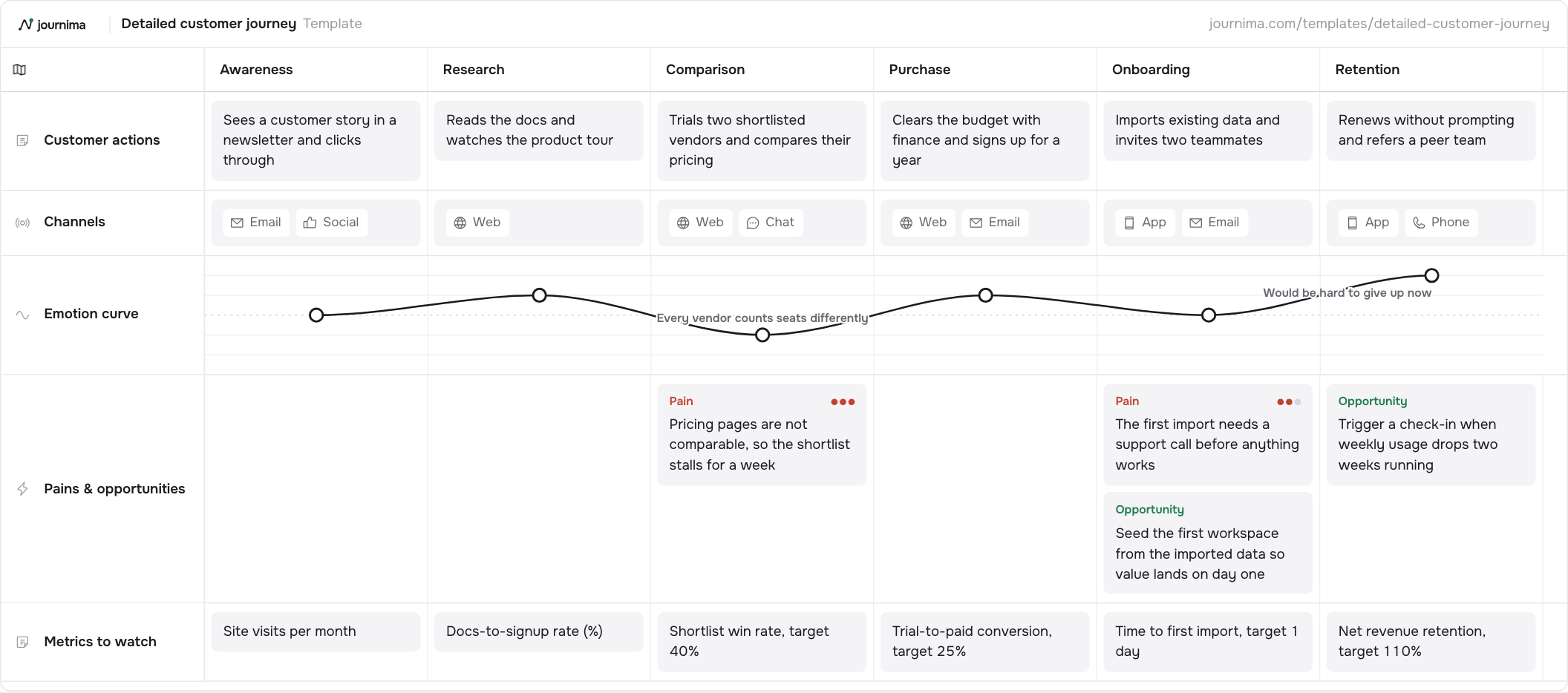
Use it when the basic map has done its job and the team wants evidence. Six stages take the customer from first awareness through onboarding to retention. Channels, an emotion curve, pains and opportunities and a metrics lane sit under every stage, so each pain has a number next to it.
The example follows a software buyer across six stages, from Awareness and Research through Comparison, Purchase and Onboarding to Retention. Five lanes hang under them. The last two are what make it detailed: a pain wherever the example breaks, and a number to watch at every stage.
Use it when the room already agrees on the story and disagrees about what to do next. The heaviest pain in the example sits at Comparison, where pricing pages cannot be compared and the shortlist stalls for a week. Directly under it stands the shortlist win rate, which is the number that moves when that gets fixed.
How to fill it in
- Agree the six stages before you open a lane. Six columns is a lot to fill, and renaming a stage halfway through costs an hour. Write them, leave them, and start on the lanes when nobody wants to change one.
- Work one lane at a time, actions first. Customer actions across all six stages, then Channels across all six. Filling stage by stage instead feels faster and produces lanes nobody trusts.
- Score the emotion curve where it turns. Minus two to plus two, with a note only where the line changes direction. The example annotates Comparison, where every vendor counts seats differently, and Retention, where the product has become hard to give up.
- Fill Pains & opportunities, and score the pains. The example marks the pricing comparison hardest, then the first import that needs a support call. Two opportunities sit in the same lane: seed the first workspace from the imported data, and check in when weekly usage drops.
- Put one number under each stage. Pick the metric that would move if the pain above it were fixed. The example pairs the stalled shortlist with a shortlist win rate, and the slow first import with time to first import.
- Give every pain an owner before people leave. A detailed map produces more items than one team can carry. Name who will find the evidence for each one, or the lane becomes a list of complaints.
Download the template
Download for ExcelA spreadsheet, one column per stage.
Download as PNGThe whole grid as one picture.
The Excel file opens in Excel, Numbers and Google Sheets. Fill it in, then import it into Journima when you have an account.
How to adapt it
- Delete the stages you do not own. A support team rarely needs Awareness.
- Turn each metric to watch into a metric card bound to a sheet so the numbers stay current.
- Turn each opportunity into a portfolio item and rank it.
Questions about the detailed customer journey map template
What is the difference between a basic and a detailed journey map?
Lanes, not stages. A basic map settles what the customer does, where it happens and how it feels. A detailed one adds where it hurts and what you measure, so the map can carry a budget conversation.
How many lanes can a map carry before nobody reads it?
Five, as here, is comfortable. Journima offers fifteen lane types, and a map using ten of them is one nobody scrolls to the bottom of. Add a lane when the same question keeps being asked.
Which metrics belong on a journey map?
The ones a stage owner already reports, one per stage. If a number needs a fresh query every time somebody asks for it, the map will be out of date within a month. Metric cards sit under the stage they measure.
How often does a detailed map need updating?
The stages and lanes hold for a quarter or two. The numbers should refresh themselves, and the pains should change as you close them. A map that needs a workshop to stay current is already behind. Keeping a map alive
Keep reading
Other templates
Basic customer journey
A minimal end-to-end journey: what the customer does, where it happens, and how it feels.
4 stages · 3 lanes TextChannelsEmotion curveService blueprint
Frontstage and backstage view of one service encounter, from first contact to follow-up.
5 stages · 4 lanes TextFrontstageBackstageDay in the life
Shadow one person through a typical day to find the moments that matter.
5 stages · 4 lanes TextChannelsEmotion curvePains and opportunitiesEmployee onboarding
The new hire's first quarter: actions on both sides and how the experience feels.
5 stages · 4 lanes TextBackstageEmotion curvePains and opportunitiesB2B buyer journey
A buying committee's path from problem to rollout, with content touchpoints and deal metrics.
6 stages · 4 lanes TextChannelsPains and opportunitiesE-commerce purchase journey
From discovery to post-purchase: where shoppers drop off and what to measure.
6 stages · 5 lanes TextChannelsEmotion curvePains and opportunitiesSupport & complaint journey
A support case end to end: customer, front line, and what happens behind the desk.
5 stages · 5 lanes TextChannelsFrontstageBackstageEmotion curvePatient journey
A care journey from first symptoms to aftercare, tracking experience along the way.
6 stages · 4 lanes TextChannelsEmotion curvePains and opportunitiesSee your journeys take shape.
Start your free 14-day trial. No card needed.