Payment fails twice and the order never confirms
Support and complaint journey template
A support case end to end: customer, front line, and what happens behind the desk.
Support & complaint journeyTemplate
01Issue occurs
02Contact
03Triage
04Resolution
05Follow-up
Customer actions
Searches the help centre, gives up and opens a chat
Repeats the order number to a second agent
Accepts the refund and places the order again
Rates the case once the money is back on the card
Channels
- Web
- Web
- Chat
- Chat
- Phone
Front line
Error message names the failure and links to the help page
Chat answers in under two minutes and captures the order number
Agent hands the case to payments with the history attached
Specialist confirms the refund and the date it will land
Case closes with a written summary and one survey question
Behind the scenes
Failed payments are logged with the gateway response code
A ticket opens and matches itself to the order automatically
Routing rules assign tier-2 ownership within 15 minutes
Refund is raised in the ledger and reconciled the next day
Root cause is tagged and taken to the weekly defect review
Emotion curve
What is in the support and complaint journey template
5 stages
- Issue occurs
- Contact
- Triage
- Resolution
- Follow-up
5 lanes
- Customer actions
- Text
- Channels
- Channels
- Front line
- Frontstage
- Behind the scenes
- Backstage
- Emotion curve
- Emotion curve
When to map a support case
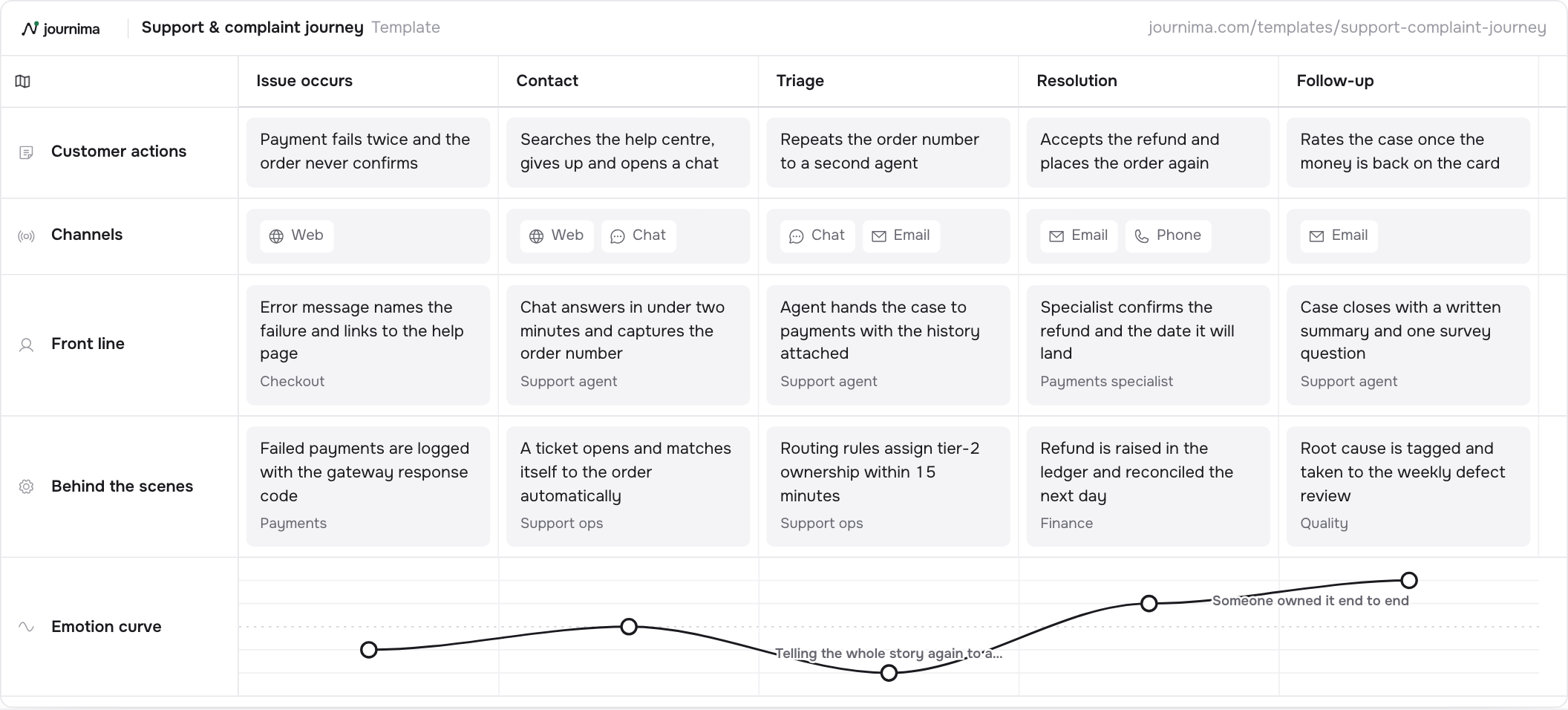
Use it for a support case from the moment something goes wrong to the follow-up afterwards. Customer actions, the channels they use, the front line's response and what happens behind the scenes sit on one canvas, with an emotion curve across all five stages. It is the map for handoffs between tiers and for the cost of a resolution.
The example follows one failed payment through five stages: Issue occurs, Contact, Triage, Resolution and Follow-up. The customer looks for an answer alone, gives up, opens a chat, then repeats the order number to a second agent. That retelling is the low point of the curve, at minus two.
Four lanes sit under Customer actions, and two of them carry the service. Front line holds what the customer can see, from the checkout error message to the payments specialist. Behind the scenes holds what the customer never sees: the gateway log, the ticket, the routing rule, the ledger entry, the defect review.
How to fill it in
- Start before the ticket. The first stage in the example is the failure itself: a payment that fails twice and an order that never confirms. If the map starts at the ticket, every fix you find will be a ticket fix.
- Record what the customer tried alone. Self-service comes first in most cases, and giving up on it is a finding. The example records it at Contact, where the Channels lane shows the switch from the web to chat.
- Fill Front line with everything the customer meets. Each card names the actor: the checkout, the chat agent, the payments specialist. An error message belongs in this lane too, and it is usually the cheapest card on the map to fix.
- Give every Behind the scenes card its team. Payments logs the gateway code, support ops opens and routes the ticket, finance raises the refund, quality tags the root cause. A handoff shows up as a change of owner between two cells.
- Read the curve against the handoffs. The low point here is not the failed payment, which scores minus one. It is the retelling at Triage, at minus two, and the lanes below show which handoff produced it.
Download the template
Download for ExcelA spreadsheet, one column per stage.
Download as PNGThe whole grid as one picture.
The Excel file opens in Excel, Numbers and Google Sheets. Fill it in, then import it into Journima when you have an account.
How to adapt it
- Add a metric lane for first response time, handle time and reopen rate.
- Name the queue or team on each behind the scenes card.
- Map a complaint and a routine request as two personas on the same map.
Questions about the support and complaint journey template
Should a support map cover one case type or all of them?
One type, end to end. Failed payments, damaged goods and password resets break in different places, and a map that covers all three describes none of them. Draw the most expensive type first.
How is this different from a support process diagram?
A process diagram shows the steps your teams take. This map keeps them in the lower lanes and puts the customer's own actions and feelings above them. The value is in the gap between stages. Chat answers in under two minutes at Contact, then the routing rules have up to fifteen minutes at Triage to find an owner.
Why does the emotion curve bottom out in the middle?
Because the middle is where a case changes hands. The example scores minus two at Triage, when the customer repeats the order number to a second agent. The original failure scores only minus one.
Who needs to see the finished map?
The people who write the error messages and the people who set the routing rules, not only the support managers. Both of them own cards here, one in Front line and one in Behind the scenes.
Keep reading
Other templates
Basic customer journey
A minimal end-to-end journey: what the customer does, where it happens, and how it feels.
4 stages · 3 lanes TextChannelsEmotion curveDetailed customer journey
A fuller journey with channels, an emotion curve, pains and opportunities, and the metrics to watch.
6 stages · 5 lanes TextChannelsEmotion curvePains and opportunitiesService blueprint
Frontstage and backstage view of one service encounter, from first contact to follow-up.
5 stages · 4 lanes TextFrontstageBackstageDay in the life
Shadow one person through a typical day to find the moments that matter.
5 stages · 4 lanes TextChannelsEmotion curvePains and opportunitiesEmployee onboarding
The new hire's first quarter: actions on both sides and how the experience feels.
5 stages · 4 lanes TextBackstageEmotion curvePains and opportunitiesB2B buyer journey
A buying committee's path from problem to rollout, with content touchpoints and deal metrics.
6 stages · 4 lanes TextChannelsPains and opportunitiesE-commerce purchase journey
From discovery to post-purchase: where shoppers drop off and what to measure.
6 stages · 5 lanes TextChannelsEmotion curvePains and opportunitiesPatient journey
A care journey from first symptoms to aftercare, tracking experience along the way.
6 stages · 4 lanes TextChannelsEmotion curvePains and opportunitiesSee your journeys take shape.
Start your free 14-day trial. No card needed.